
You can use the Expense Submission feature to request reimbursement for work-related costs paid out of pocket, such as travel, meals, internet bills, or office supplies.
Step 1: Access the Platform Log into the Payoneer WFM platform using your credentials to access your personalized dashboard.
Step 2: Navigate to Expenses Locate and click on the Expenses section in the side panel. This will direct you to the main expense management page.

Step 3: Initiate a New Claim Click the Add Expense button located in the top right corner of the page. This opens a dedicated form to enter your claim details.
Note: Each claim submission is limited to one individual expense.
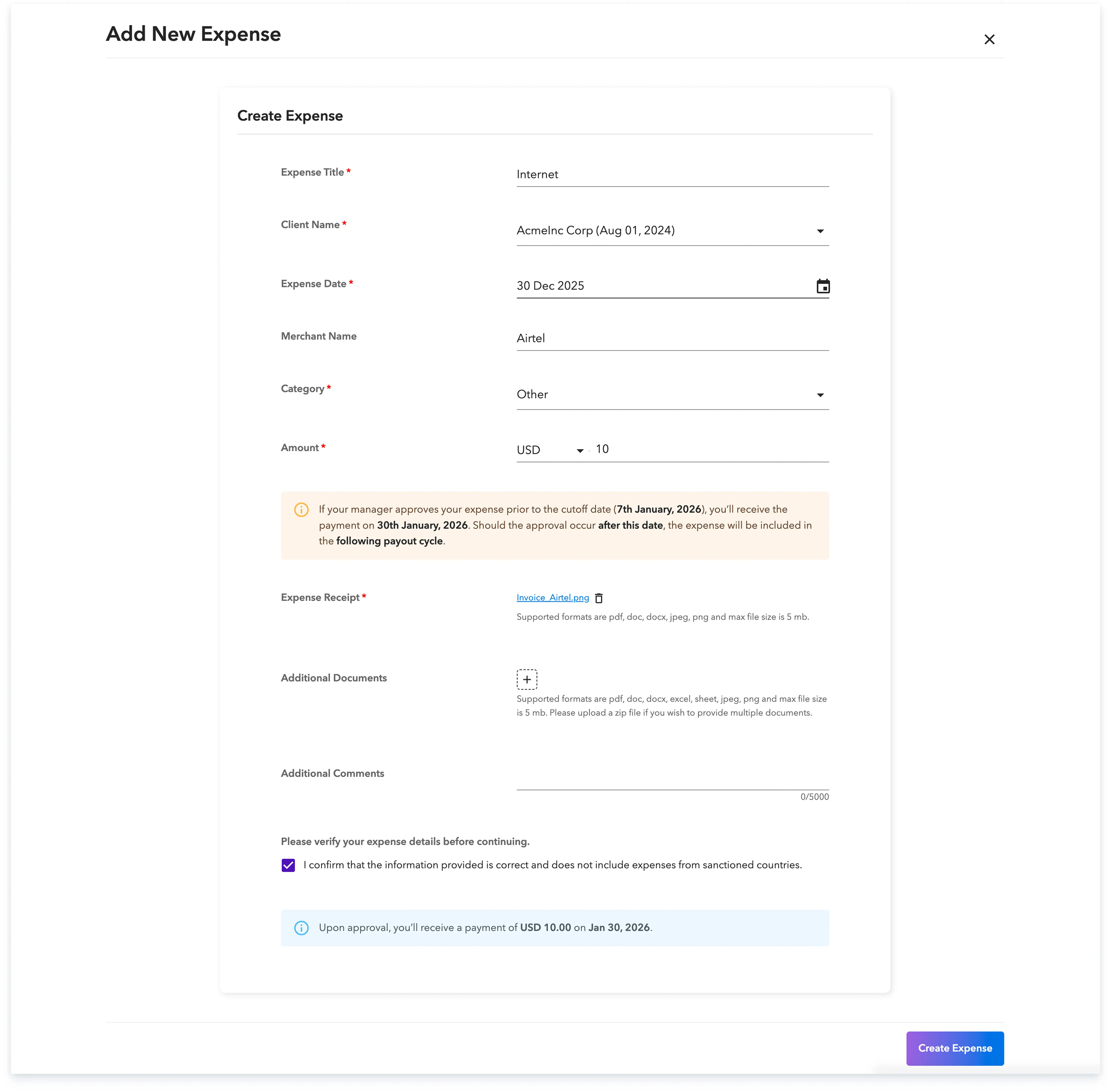
Step 4: Provide Details and Documentation Fill in the required information for your cost and upload your receipts as proof of purchase. Once all fields are complete and the file is attached, click Create Expense.

Step 5: Track Your Status Monitor the progress of your submission directly on the Expenses page, where the current status of each claim is displayed.

Once your manager approves the claim, your reimbursement will be processed alongside your regular salary payment, provided it meets the monthly cutoff date.
Global employment, payroll, teams and expansion, simplified.
Request demo