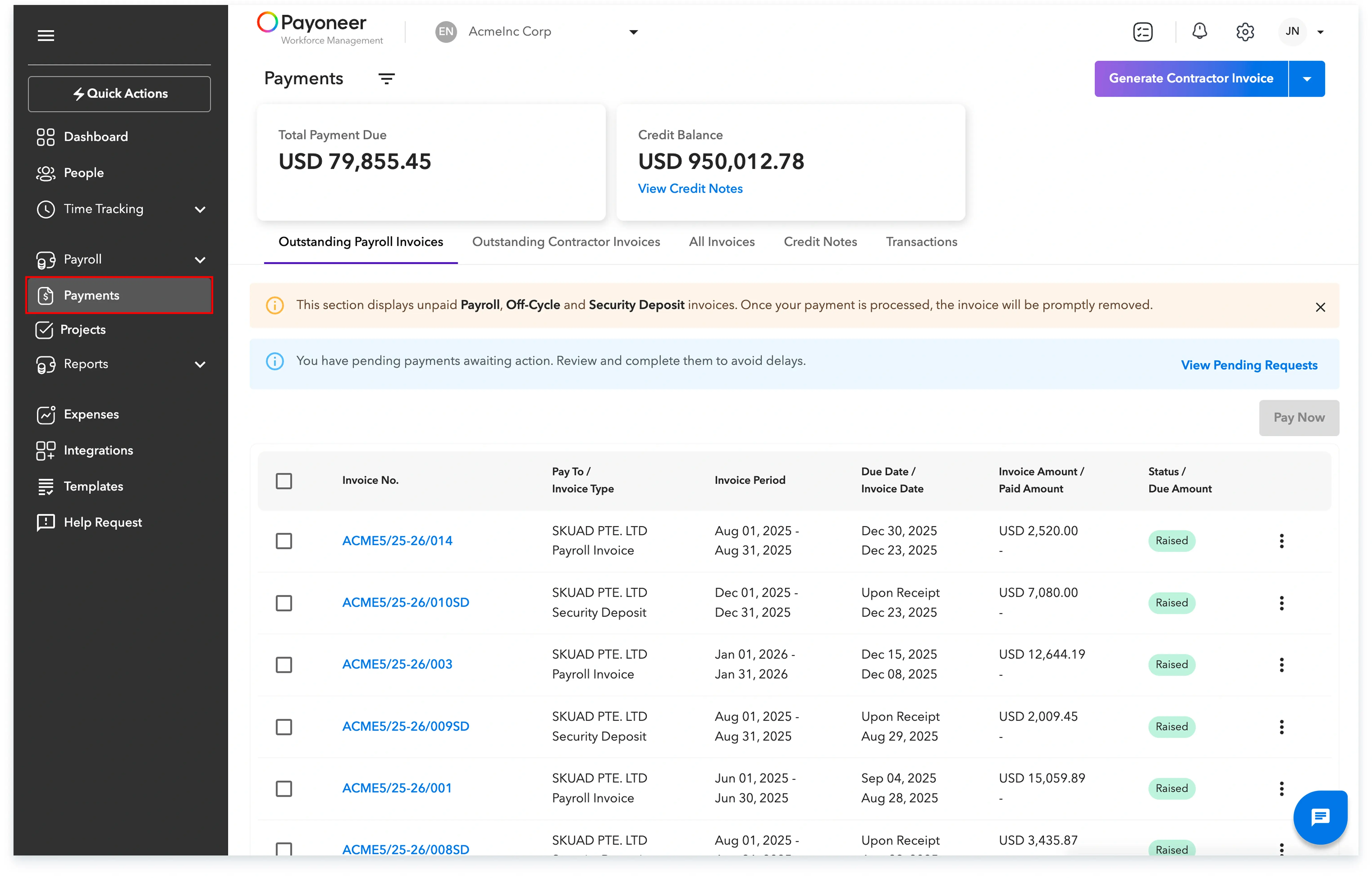
You can easily view and manage all your financial transactions, including invoices, within the 'Payments' section of your Payoneer WFM dashboard.
Log In To Payoneer WFM Platform andNavigate to the 'Payments' tab on your Payoneer WFM dashboard to get an overview of your financial transactions.
The Payments section is divided into six subsections: Outstanding Payroll Invoices, Outstanding Contractor Invoices, All Invoices, Credit Notes, Transactions, and Security Deposits, each providing specific transaction-related information.
Understanding the subsections:
Subsection
Description
Outstanding Payroll Invoices
Lists unpaid invoices related to payroll activities, such as off-cycle payments, highlighting pending financial obligations for payroll.
Outstanding Contractor Invoices
Contains contractor invoices that have not yet been settled, showcasing outstanding payments for contractor services.
All Invoices
A comprehensive view of all invoices generated on Payoneer WFM, paid and unpaid.
Credit Notes
You can also review 'Credit Notes', which displays all credit notes and their status, detailing available credits that can be applied to future invoices.
Transactions
Provides a record of all financial transactions processed in Payoneer WFM, including payments made and received, for detailed financial tracking.